Home Network Setup
How my home lab connects my laptop, NAS, mini-PC, and phone into a remotely accessible development environment.
When I leave my desk, my development environment doesn't have to stay behind. I can open my phone, test an app running at home, and ask my coding agent to make a change—all using the same terminal tools I use on my laptop, without a remote desktop.
I want to take some time to go over the incredibly awesome home lab/network setup that I have going. Many of the technologies I'm using are used by others; there isn't anything secret going on. I do think that I have a pretty unique setup in the sense that I have brought all of these together in a very functional way.
I'll start just by covering some of my goals, then list out all the technologies I'm using, and finally go into a more serious description of how it works.
I've been working on this piecemeal over the past few months. I started when I got my first NAS and wanted to make it easy to connect to that. I did the basics: setting up SSH, some backups, Docker on the NAS with a few services, etc. Normal home lab things.
More recently, I decided to get a mini-PC and at the same time ordered a Pixel 11 Fold. That is where things really started to take off.
I now have a really incredible system that allows me to access everything remotely from my phone or work comfortably from my laptop. Basically, every device has access to all the files that I need it to, and the applications I work on are dynamically managed so they can be accessed without me having to remember tons of ports and such. It is basically an enterprise-level private cloud. With the rise of agentic AI, this is that much easier to set up and that much more useful.
Apps, Hardware, and Infrastructure
- Hardware
- Software
- Podman (Docker)
- SSH (machine access)
- Homepage (dynamic service registration)
- Herdr (agent-focused terminal multiplexer)
- Termux (phone terminal)
- VS Code (IDE)
- Kopia (backups)
- Git (software version control)
- Gitea (local Git hosting)
- Traefik (service proxy)
- WireGuard/Tailscale (VPN)
- btop (TUI-based performance monitor)
- k9s (TUI-based Kubernetes client)
- lazydocker (TUI-based Docker client)
- lazygit (TUI-based Git client)
- nano/helix (local file editing)
- Pi (coding agent)
- Codex (coding agent/image generation)
- AdGuard (DNS)
- Home Assistant (home automation)
- Obsidian (local Notion alternative)
- Ghostty (terminal emulator)
How It All Works
Prepare yourself! It's time to step through my lengthy explanation of everything I've put together for my setup. As I was writing this I began to realize that I really have put in quite a bit of work to make this function the way I like. As daunting as it my seem I still highly recommend anyone who is interested in giving this a shot. Well worth it.
Anyway, here is a brief diagram just to outline the flow.
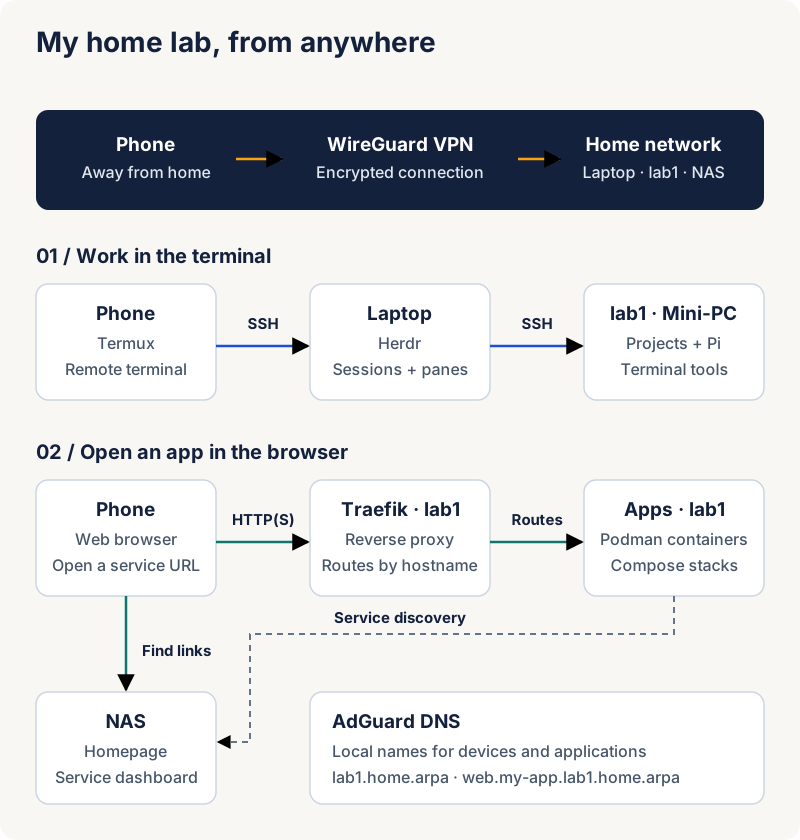
Now that I'm writing it out, I can see that it is actually pretty complex. Before I break things down service by service, I'm going to just share a description of how I actually use it and try to highlight the services so you can see how they contribute to the overall vision.
Let's say that I start off sitting at my laptop. I might start my day by opening up Obsidian and writing out my thoughts. I have a service on my laptop that automatically commits my Obsidian vault in Git and pushes it to Gitea, my self-hosted Git server, every 15 minutes.
Once I have my thoughts in order, I open up Ghostty, my terminal emulator, and immediately run Herdr, my agent-first multiplexer. This allows me to multitask very efficiently within my terminal. I can split panes, run multiple agents, and get notifications when an agent finishes its work.
At this point, I will usually want to connect to lab1, my GTKTec M7 Ultra mini-PC. Lab1 has its DNS configured in AdGuard as lab1.home.arpa so I can access it easily. I already have SSH set up between my laptop and lab1, so I'm able to add it to my Herdr session via herdr machine add lab1. When I run that command, lab1 is immediately available within Herdr itself.
Now that I have access to lab1 over the network, I can open up a session in a project folder and use Podman to bring up the Docker Compose stack. Podman is just an alternative container runtime. Docker works just as well but has a slightly different feature set. They do have a mostly compatible CLI, though.
I have set up my compose.yml files to have Traefik configuration so that whenever a properly configured Compose stack comes up on lab1, it automatically gets discovered by Homepage, a dashboard that creates easy-to-access links. I have Traefik configured so that Docker stacks automatically generate hostnames based on the project and service names. So a project named my-app with a web service would end up with a URL in Homepage like web.my-app.lab1.home.arpa.
Traefik works as a proxy so all of my applications can share ports 80/443/whatever. I can still access them directly if I need to hit something specific, though; something like lab1.home.arpa:5243 works just fine. The Homepage server runs on my NAS, which serves as a neutral hub for services across my network.
I can also use VS Code to edit these remote projects or manage things easily. It has built-in remote editing features that are built on SSH, so it is no problem for me to open up a folder on lab1 and manage it from my laptop.
While I do have VS Code installed and use it regularly, I try to keep as much of my work in the terminal as possible. I'll explain why later.
Practically speaking, the way I accomplish this is through a series of tools that replace what I would usually use VS Code or GUI applications for: lazydocker for managing containers, lazygit for managing Git, nano/helix for text editing, k9s for managing Kubernetes, and btop for managing my system resources. Most of my actual coding work is done through my coding agent, Pi.
Now for the fun part. Suppose something comes up and I need to leave my desk. Maybe I have to take my kids somewhere, maybe I want to go work at a coffee shop, or maybe I just want to go for a walk. My Pixel 11 Pro Fold is set up to integrate with all of these same services. It works so well that it is hard to overstate how much I like working with it.
Anytime, any place, I can open up my Fold and instantly interact with my stack. I've set up my phone so that it uses WireGuard as a VPN to my home network. This makes my laptop, lab1, and NAS available via their hostnames registered in AdGuard.
My phone has Termux installed, which is a terminal emulator for Android. Using Termux, I can SSH into my laptop using ssh laptop and, once there, immediately run herdr. Herdr works exactly the same on my phone as it does on the laptop. With the extra screen space my phone affords me, I can easily navigate all my apps and projects.
Remember when I pointed out trying to move all of my development tools onto the terminal? This is why. Some people claim that TUI applications are just glorified GUIs for nerds that want to feel superior. One very real advantage of these TUI applications, though, is that since they are rendered through the terminal, I can get the full experience of working with my regular app interface on my phone. Lazygit, lazydocker, k9s, btop, nano/helix, etc., all look the same on my phone as they do on my laptop.
My development environment is completely accessible from my phone! The best part? No remote desktop lag!
Since my phone is on the VPN, it is able to access Homepage on the NAS as well as all of the services it exposes. This means that all of my Compose stacks running on my home network are fully available on my phone with the click of a button. This makes it insanely easy to open up a project on my phone, test a feature, open Termux > Herdr > Pi, and delegate some new work for my agent to do.
On top of this, I've configured Kopia to do backups for both my laptop and lab1 machines. This makes it incredibly easy to keep things safe and in sync and gives me a lot of peace of mind. Since I have the backup policy configured the way I like, I can also easily run the backup, format the drive, and start fresh if something ever goes very wrong.
Conclusion
Well, if you made it this far, I hope you feel like it was worth it! I set all this up over the course of several weeks piece by piece. I learned a lot along the way and have used this every day since putting it together. Even if you don't have a folding phone I still think you could get a lot of use out of something like this. The biggest problem would just be rendering TUI apps that are very information dense. Other than that, everything should work just the same.
Give it a shot! Happy hacking.
Glossary
Hardware
- NAS (Network-Attached Storage): A storage device available over the network. In my setup, it also hosts services like Homepage and acts as a central hub.
- Laptop: My main local workstation and the machine I SSH into from my phone to access Herdr and my development tools.
- Pixel 11 Pro Fold: The foldable Android phone described in this setup. Its larger screen gives me room to use terminal applications and access my home services remotely.
- GTKTec M7 Ultra (lab1): The mini-PC I use as a development host for remote projects, containers, and services.
lab1is my name for this machine.
Software
- AdGuard Home: A self-hosted DNS server with filtering capabilities. It resolves local names like
lab1.home.arpain my network. - btop: A terminal-based system monitor that displays CPU, memory, disk, network, and process activity.
- Codex: OpenAI's coding agent, which helps with software development tasks. Image generation is also part of my agent workflow, depending on the tools available.
- Docker: A platform for building and running containers, which package applications with the dependencies they need.
- Docker Compose: A tool for defining and running a group of containers using a YAML file, such as
compose.yml. I refer to these groups as Compose stacks. - Ghostty: A terminal emulator: the application window where I interact with my shell and terminal tools on my laptop.
- Git: A version control system that tracks changes to files. I use it for source code and for recording changes to my Obsidian notes.
- Gitea: A self-hosted Git hosting service with repositories, a web interface, and collaboration features. It receives the Git updates from my Obsidian vault.
- Helix: A terminal-based text editor with modal editing, meaning different modes handle tasks like entering text and navigating files.
- Herdr: An agent-focused terminal multiplexer that organizes work into sessions and panes, supports remote machines, and provides agent notifications.
- Home Assistant: A home automation platform for connecting and controlling smart devices and creating automations.
- Homepage: A self-hosted dashboard that brings links and information about services into one place. My setup uses it to make running applications easy to find.
- k9s: A terminal interface for viewing and managing Kubernetes clusters and their workloads.
- Kopia: A backup tool that creates encrypted, deduplicated snapshots of files, allowing earlier versions to be restored. Backups protect data; they are not the same as live file synchronization.
- Kubernetes (k8s): A system for deploying and managing containerized applications.
k8sis an abbreviation for Kubernetes;k9sis a separate tool for interacting with it. - lazydocker: A terminal interface for inspecting and managing Docker containers, images, logs, and related resources.
- lazygit: A terminal interface for Git operations such as reviewing changes, staging files, committing, and managing branches.
- nano: A straightforward terminal-based text editor, useful for quick file and configuration changes.
- Obsidian: A note-taking application that stores notes as local Markdown files. A collection of notes is called a vault.
- Pi: The coding agent I use for most of my development work. It runs in the terminal and can work with project files and development tools.
- Podman: A container engine that can run containers without a central daemon and supports running them without root privileges. Its command-line interface is largely compatible with Docker's.
- SSH (Secure Shell): A protocol for securely accessing another machine's command line over a network. It also supports capabilities like tunneling and file transfers.
- Tailscale: A VPN service built on WireGuard that helps connect devices into a private network without manually configuring every peer connection.
- Termux: An Android terminal emulator and Linux environment that provides tools such as SSH, letting me connect to my laptop from my phone.
- Traefik: A reverse proxy that routes incoming requests to the appropriate application. It can discover services through supported providers and configuration.
- VS Code (Visual Studio Code): A code editor with extensions for development tasks, including editing projects on remote machines over SSH.
- WireGuard: A VPN protocol and software that creates encrypted connections between devices. I use it to reach my home network from my phone.
Networking and Terminal Terms
- CLI (Command-Line Interface): A way to interact with software by typing commands into a terminal.
- DNS (Domain Name System): The system that translates names such as
lab1.home.arpainto IP addresses that devices use to connect. - GUI (Graphical User Interface): An interface built around graphical elements such as windows, icons, and buttons.
- home.arpa: A domain reserved for naming devices and services on home networks. Names under it are resolved locally rather than serving as public internet addresses.
- IDE (Integrated Development Environment): Software that brings together development tools such as editing, debugging, and project navigation.
- Reverse proxy: A server that receives requests and forwards them to other services. This lets multiple web applications share an entry point while using different hostnames.
- Terminal multiplexer: A tool that manages multiple terminal sessions or panes within one terminal interface.
- TUI (Text User Interface): An interactive interface drawn with text in a terminal. Tools like lazygit and btop can therefore be used over SSH without a graphical remote desktop.
- VPN (Virtual Private Network): An encrypted network connection that allows devices to communicate privately across another network, such as the internet.